
Sessions
Trades live in named sessions with their own small dashboards, and the Main Archive holds every trade.
3.1.1Why trades live in sessions
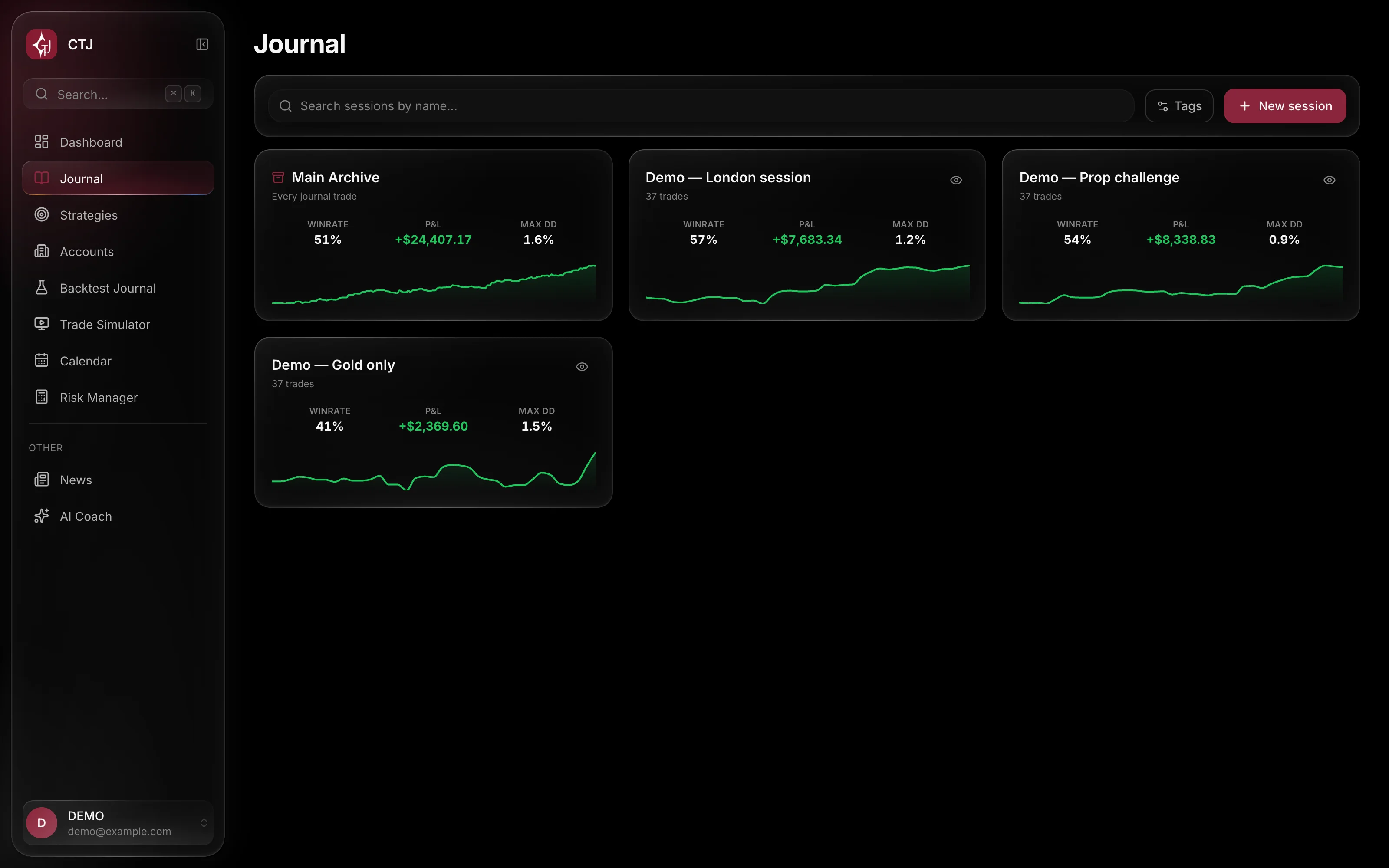
Journal is the place where you record real trades. It opens with a grid of cards. Each card is a session, a named set of trades with its own figures and its own small chart. A session can be a month, a setup, a funded challenge, an account or a week of trading by a new rule.
One long list does not show whether June went better than May. With a session for each month, two cards answer the question.
3.1.2The Main Archive
The first card is always Main Archive, with the words Every journal trade. Every trade you record goes here by itself, from whichever session you add it. The archive does not count towards the number of sessions on your plan.
The archive shows trades except those that belong only to hidden sessions. You can search and filter trades, open screenshots and delete trades here. If you have your own sessions, also lets you change session links from the archive. New trades and edits are made inside your own sessions. The archive has no settings, no eye button and no button New Trade.
3.1.3What a card tells you
A card shows the name of the session, the number of trades and three figures. Winrate is the share of winning trades. P&L is the result in dollars. Max DD is the deepest drawdown in per cent. The small chart under them shows how the balance of the session moved.
Up to four tags fit on a card, and +2 means that two more are attached. The figures come from the trades of this session and from its own starting balance, so cards do not affect each other.
Click a card to open the session. Your own sessions stand in the order you created them.
3.1.4Creating a session
New session at the top of the page opens a window with six fields. Only the name is required.
- Name has up to 80 characters, for example London session.
- Starting balance is the sum the figures of the card count from. An empty field means the balance from your settings.
- Instrument is a free note about what you trade here, up to 60 characters.
- Strategy is filled in for you in every new trade of this session.
- Account is filled in for you in every new trade of this session too.
- Description has room for a plan or conditions, up to 500 characters.
Create adds the session to the grid. You can change every field later in the settings of the session. Tags are attached there too.
The number of sessions depends on the plan. Starter has 2, Just has 7, PRO MAX has 32 and VIP has 1,000. When trades, sessions or tags are nearly at their limit, a strip Plan limits appears above the cards. The button Upgrade plan on it opens the plan window.
3.1.5Finding a session
Search sessions by name… looks through the names of sessions and the names of their tags. The grid changes with every letter.
The row Filter by tags: appears after you create the first tag. Press a tag to see the sessions that carry it. Press several tags to see the sessions with any of them. Clear turns all of them off. The search and the tags work together. Hidden sessions are found too, and the Main Archive always stays on screen.
3.1.6Hiding a session from the statistics
Every card of yours has an eye button . Press it, and the session becomes hidden. The card turns pale and gets the mark Hidden. Press the eye again, and everything returns at once.
A hidden session is not deleted. You can open it and work in it. Its trades leave the statistics in this way.
- The Dashboard and the Calendar stop counting them.
- They leave the list of the Main Archive.
- The search in the sidebar does not find them.
A trade that also belongs to a visible session stays in all these places. Hide a session to keep an experiment or a period of learning away from your real results.
3.1.7A locked session
After a paid plan ends, the account can hold more sessions than Starter allows. The extra sessions get the mark Locked and do not open. Their content stays in place for 60 days. A payment opens these sessions at once, exactly as they were.
Read also3.2 Session settings3.4 The table of trades1.6.4 When a trial or a subscription ends