
Session settings
Name, tags, starting balance, default strategy and account, chart base, and deleting a session.
3.2.1Opening the settings
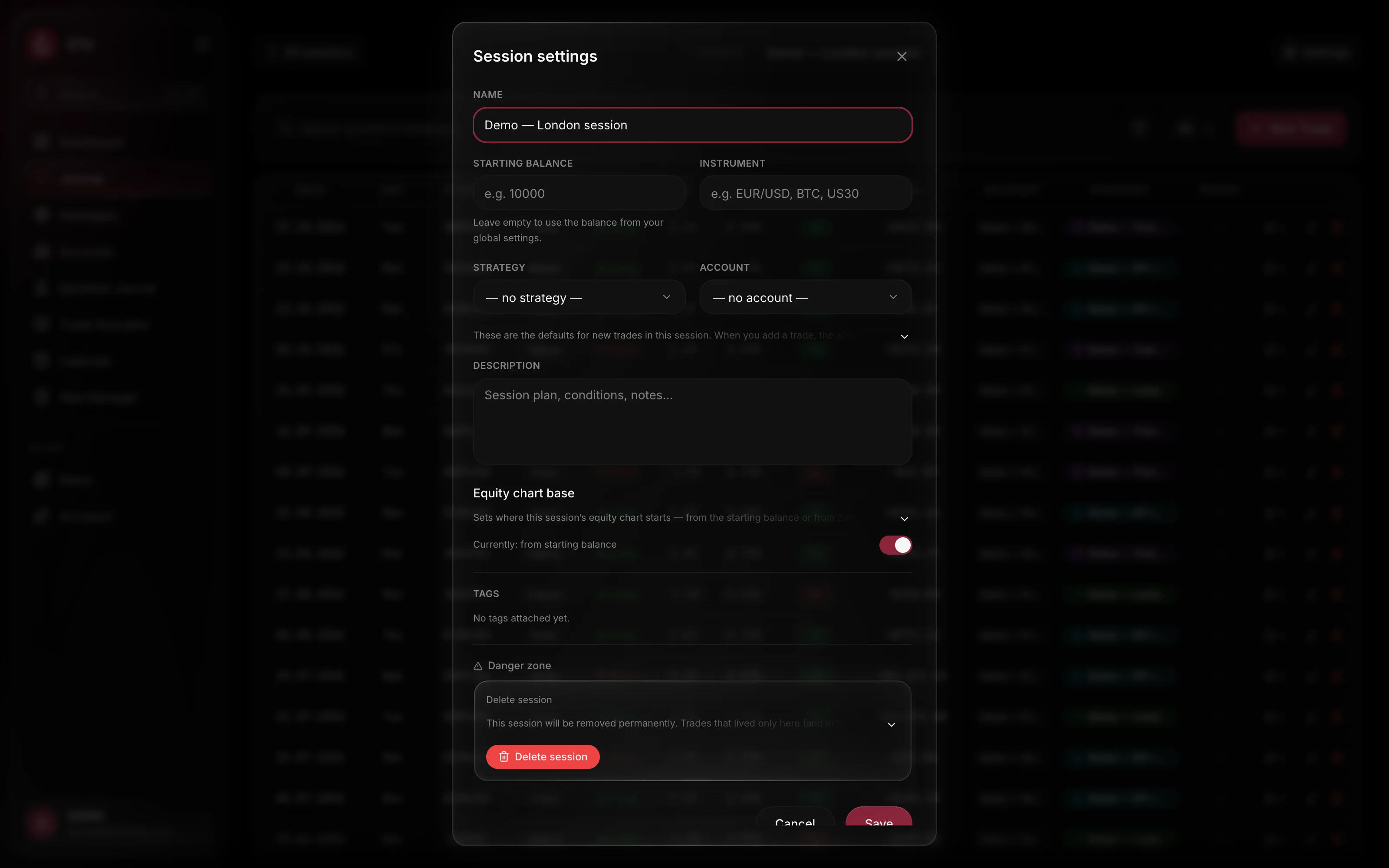
Open a session and press Settings at the top right. The window holds everything about the session itself. The fields take effect after Save. Tags and deleting work at once, without Save.
3.2.2Name, instrument and description
Name is the title on the card, up to 80 characters. Instrument is a free note about what the session trades, for example EUR/USD or US30, up to 60 characters. Description holds a plan, conditions or notes, up to 500 characters. These three fields are for you and do not change any numbers.
3.2.3Tags
The part Tags shows the tags of this session. Attach tag opens the list Available tags. Press a tag with a plus to attach it. Press a tag with a cross to take it off. Done closes the list.
A new tag is created in the window Manage tags, behind the button Tags above the session cards.
3.2.4Starting balance
Starting balance is the sum the figures of this session count from. A challenge on 100,000 dollars needs its own base, or its percentages would be counted from your personal balance.
An empty field means the balance from the Account tab of the settings. The field changes the card of this session only. The Dashboard keeps its own base.
3.2.5Default strategy and account
Strategy and Account are the defaults for new trades in this session. If you set a strategy, the new trade form fills it in. If the session has no default account, the form uses your first account, if you have one. You can change or clear either field. The defaults do not touch trades you have already added.
Use them when a session has one setup and one account. Each trade then gets to the right account and strategy on the Dashboard without extra work. More about binding in the window repeats these rules.
3.2.6Equity chart base
The switch Equity chart base sets where the small chart on the card begins.
- On, the chart starts from the starting balance. The line under the switch says Currently: from starting balance.
- Off, the chart shows the sum of the results and leaves the deposit out. The line says Currently: pure P&L from zero.
Max DD on the card follows the same base. Trades do not change. The chart of the Dashboard has a separate switch on the Appearance tab of the settings.
3.2.7Deleting a session
Delete session stands in the Danger zone at the bottom of the window. A trade that lived only in this session is deleted with it for good, from the Main Archive too, with its notes and screenshots. A trade that also belongs to another session stays there.
Deleting is confirmed with I understand, delete and cannot be undone. To take a session out of the statistics and keep it, press the eye on its card.
Read also3.1.6 Hiding a session from the statistics3.7 One trade in several sessions12.2.4 Starting balance