
Choosing a plan
After sign-up you pick Starter, Just, PRO MAX or VIP, and the free trial of a paid plan is offered only at this moment.
1.3.1The plan window
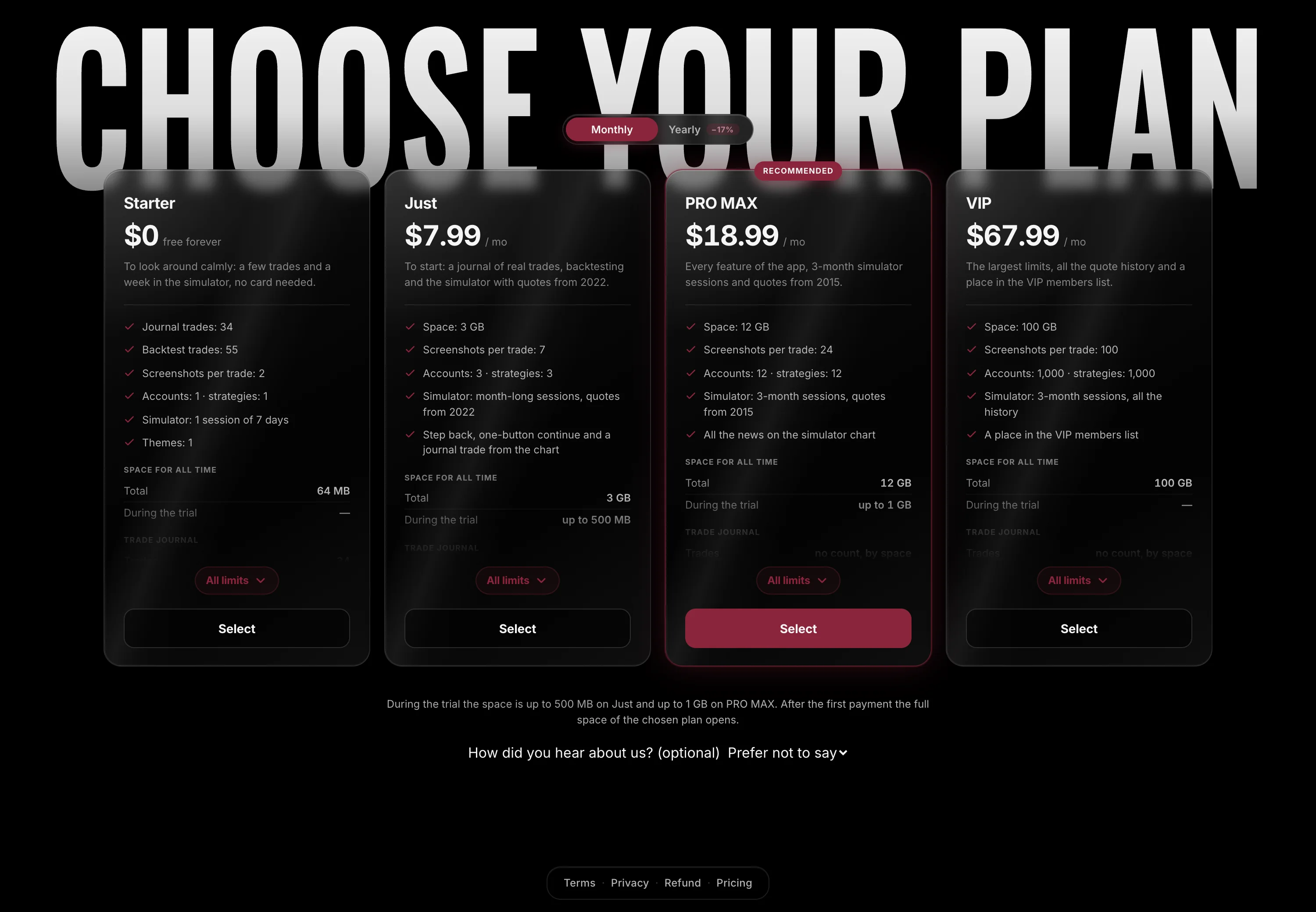
After the code is confirmed you choose a plan. The window has four cards, Starter, Just ($7.99 a month), PRO MAX ($18.99 a month) and VIP ($67.99 a month). The app opens when the choice is made.
A press on Select does not start the plan at once. A second window opens first and says what the choice means. You confirm it there, or press Back and look at the other cards.
Under the cards there is an optional list, How did you hear about us?. The answer changes nothing in your account.
1.3.2Monthly or yearly
The switch above the cards has two positions, Monthly and Yearly. With Yearly on, every paid card shows the price of one month inside a yearly payment, the sum for the whole year and the saving in per cent. The yearly payment costs as much as ten months. The plan itself is the same in both positions.
The position matters for VIP, where the payment page opens with the period you have chosen here. For Just and PRO MAX you choose the period again when you pay.
1.3.3Reading a card
A card shows the price, one sentence about who the plan is for, and a short list of what it includes. All limits opens the full list of numbers for this plan, and Show less closes it. The other cards stay where they are, and you can open several lists and compare them line by line.
1.3.4What the space of a plan is
Paid plans do not count trades. They give you space for the whole life of the account. Screenshots, pictures and the text of your trades, strategies and accounts take up this space.
The space has two parts, one for each journal.
- Just has 3 GB. Of these, 1 GB belong to the real journal and 2 GB to the backtest journal.
- PRO MAX has 12 GB, divided into 4 GB and 8 GB.
- VIP has 100 GB, divided into 20 GB and 80 GB.
The parts show where each journal starts. A journal that fills its own part goes on into the free room of the other one, up to the whole space. Room that is already in use is never taken away. The Subscription tab of the settings shows with two bars how much each journal uses.
1.3.5A free trial of Just or PRO MAX
Just and PRO MAX can be tried for 14 days without a card. Press Select on one of them and then Start free trial.
All the features and limits of the plan work from the first minute. Only the space is smaller until the first payment, up to 500 MB on Just and up to 1 GB on PRO MAX. The full space opens with the payment.
Add a card 3 days before the end of the trial if you want to stay on the plan. Without a card, the account moves to the limits of Starter on the last day.
The trial is offered once, in this window. Take your time with this choice.
1.3.6Choosing Starter
Starter is free and has no end date. It is meant for a calm look around, and its limits are small.
- Real trades, up to 34.
- Backtest trades, up to 55.
- Sessions in each journal, up to 2.
- Real accounts, up to 1. Real strategies, up to 1.
- Simulator sessions at the same time, up to 1, each up to 7 days long.
With Starter you give up the free trial for good. You can pay for any plan later, on any day. Confirm the choice with I understand — choose Starter.
1.3.7Choosing VIP
VIP starts with a payment and has no trial. Press Select, then Go to payment. A window for your card in the list of VIP members opens first, and the payment page follows it.
The free trial of Just and PRO MAX is not kept after this choice. If you leave the payment page without paying, the account opens on Starter. You can subscribe later from the settings.
1.3.8Your card in the list of VIP members
VIP members have a list on this website. Your card in it shows what you allow and nothing more.
- Choose a photo adds a photo for the card only. The photo of your profile stays separate. Remove photo takes it off.
- The name is required. It can be your real name, a nickname or any other name up to 60 characters long.
- The country is a list. Leave Do not show a country if you do not want it on the card.
- A short line about you is optional and has room for 120 characters.
Under the fields there are four switches, and all four are off at first.
- The photo above shows the photo on the card.
- My trader score (0–100) shows the score from your Dashboard.
- My account balance shows the balance from your Dashboard.
- My best assets: the one that earned most and the one I have traded longest shows two markets from your journal.
The preview beside the form changes while you type. The tick of consent is required, because everything on the card is public. Save and go to payment saves the card and opens the payment page. You can edit the card later from the settings. Some fields can be changed once a month, and the form shows the date of the next change.
1.3.9The welcome window and the first minutes
A short welcome appears once. Get started opens the Dashboard. It fills with numbers after your first trades. A good order for the first minutes is this one.
- Open Accounts and add the account you trade on. Trades will have somewhere to belong.
- Open Strategies and write down your main setup, even in two lines.
- Open Journal, press New session and give the session a name.
- Open the session, press New Trade and record one trade.
- Return to Dashboard and look at the first numbers.
Read also1.6 Limits, and the end of a trial12.5 Subscription3.5 Recording a trade