
News in the simulator
The economic calendar of the session with filters, results and a description of each event.
7.9.1The economic calendar of the session
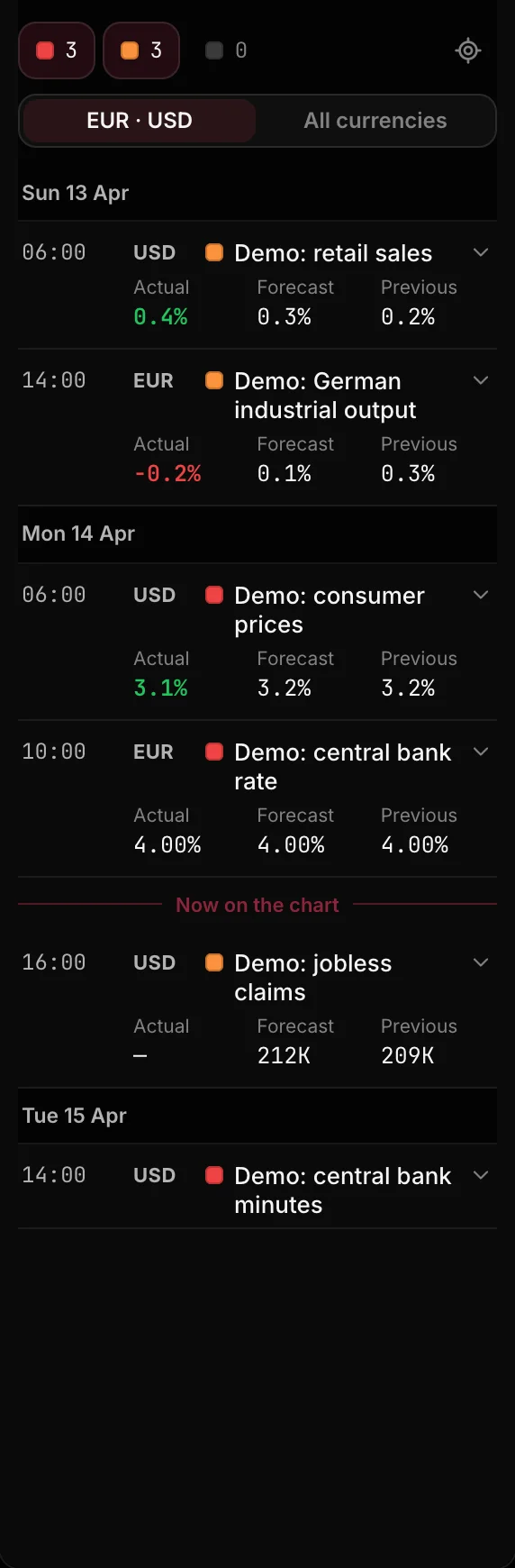
The second section of the side panel is News, the economic calendar of your period. It shows every event of the period at once, results included. This is on purpose: a backtest may look ahead, and sometimes you want to know that a big release is coming in an hour, so you can decide what you would have done.
A line marks Now on the chart, so you can tell what is past and what is ahead, and Jump to the current moment brings you back to it.
7.9.2Filters
News filters narrows the list. By impact: High impact, Medium impact, and Holidays and other. By currency: Instrument currencies, or All currencies. On the Starter and Just plans only high impact events are sent, and the other options say which plan opens them.
7.9.3One event
Each row shows the time, the currency, the name and three values: Actual, Forecast and Previous. A mark says whether the result was better than forecast or worse than forecast. All day marks events without an hour, and some rows show an approximate time, which is the usual hour of that release.
Details opens a description of the event: what it measures, its usual effect, how often it comes out and why traders care. Reading that for the events on your instrument is an education in itself.
If nothing matches the filters, the list says so; and if your period goes beyond the news archive, it says on which date the archive ends.
Read also7.6.4 News on the chart10 News